
UserWay is an AI-powered accessibility widget you add to a Squarespace site to give visitors on-page controls (contrast, text size, dyslexia-friendly fonts, a screen reader, and keyboard navigation) and to apply automated fixes aligned with standards like WCAG and the ADA. It is one of the most widely used tools of its kind. This page is a plain-English rundown of what it is, what it does, what it costs, and, just as importantly, what it can and cannot do.
Best for: Squarespace owners who want to improve site accessibility and show ADA effort without editing underlying code.
What it is
UserWay is an accessibility overlay: a widget that loads on top of your existing Squarespace site and adds a menu of accessibility tools for visitors, plus a layer of automated, AI-driven adjustments to your site’s code. Installed on millions of websites, it aims to help organisations move toward compliance with WCAG 2.1 and 2.2, the ADA, Section 508, and the European Accessibility Act, without a developer rebuilding the site. It is privacy-by-design (the widget does not collect personal information or cookies), and each subscription covers one domain. On Squarespace it installs in minutes through code injection or Google Tag Manager, which is why agencies often use it across client sites.
What it does
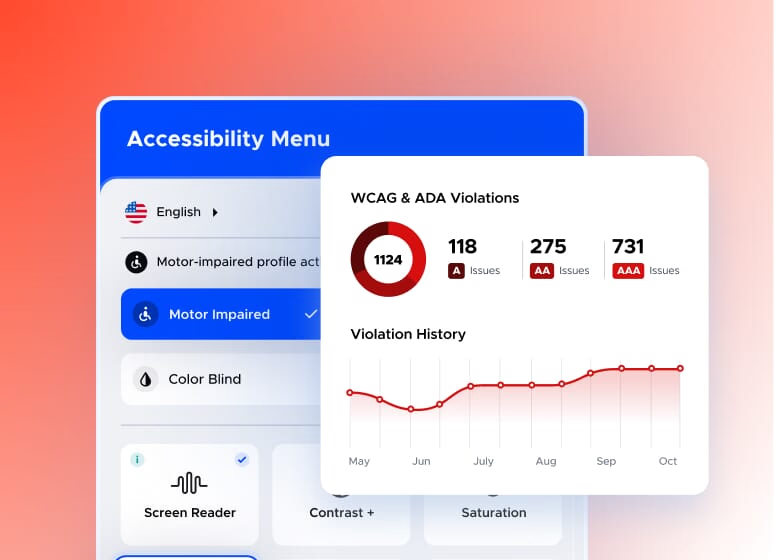
UserWay combines visitor-facing controls with behind-the-scenes adjustments. Key features include:
- Accessibility profiles and controls: contrast adjustment, larger text and spacing, dyslexia-friendly fonts, link highlighting, and a reading guide, saved per visitor.
- An on-page screen reader and keyboard navigation, with optional voice navigation, for visitors who rely on auditory feedback or non-pointer input.
- AI-driven remediations that target common code-level issues automatically, aligned with WCAG, ADA, and Section 508.
- Multilingual support for the widget controls in dozens of languages (language selector on paid tiers).
- An accessibility statement and, on annual paid plans, a Litigation Support Program informed by legal and accessibility expertise.
- A management dashboard to customise the widget’s placement, size, and colour, and to review and edit automated fixes (for example, adjusting the alt text it generates).
- Add-on services such as accessibility scanning, audits, and PDF remediation for deeper, documented work.
What an accessibility overlay can and cannot do (read this first)
This is the honest part, and it matters, because overlays are a debated topic in the accessibility world. An overlay like UserWay genuinely helps: it gives visitors useful, real controls, applies sensible automated fixes, and is far better than doing nothing, especially on a platform like Squarespace where you cannot freely edit the underlying code. But it is not a complete compliance solution, and it is important to be clear-eyed about that:
- No overlay can make a site fully WCAG compliant or guarantee protection from an ADA claim. Automated tools typically address only a portion of accessibility issues; the rest require human judgement and design choices.
- Many accessibility professionals are critical of overlays, and in some documented cases an overlay can introduce new barriers for assistive-technology users, so it should be tested, not assumed to be perfect.
- Widget-based fixes are active only while you subscribe; they layer on top of your site rather than correcting the source, so genuine code-level fixes are more durable.
- Treat it as one helpful layer, best combined with accessible design choices in Squarespace itself (good colour contrast, proper headings, alt text, descriptive links).
Used with that understanding, UserWay is a sensible, practical tool. Sold as a magic compliance button, it would be overpromising, which is exactly why the measured framing here protects both your visitors and your credibility.
Pricing
UserWay has a free plan and paid tiers that scale with your site’s traffic, priced per domain, with a free trial on paid plans. As a rough guide (check the UserWay site for current figures):
- Free: a basic widget with user-activated tools such as contrast, text resizing, and keyboard navigation. A genuine starting point, without the AI code remediations, accessibility statement, or legal support.
- Pro: from around $49 per month (roughly $490 per year) for smaller sites up to about 100,000 monthly page views, adding AI-powered remediations, real-time monitoring, an accessibility statement, and the legal support program.
- Pro Plus: around $119 per month (roughly $1,190 per year) for medium sites, adding a dedicated account manager.
- Ultimate: around $249 per month for larger sites and higher traffic, with custom options above that.
Two honest notes. The cost can feel steep for very small organisations, and because pricing is tied to traffic, it pays to check how usage is counted against your actual visitor numbers. Subdomains are billed as separate sites.
Who it is for
UserWay suits Squarespace owners who want to make a real, visible accessibility improvement quickly, particularly those who cannot edit the underlying code and want visitor-facing tools plus some automated remediation. It is popular with agencies managing many client sites (there is a partner program), and the paid tiers’ legal support has practical value for businesses worried about ADA demand letters. It is less suitable as your only measure if you need genuine, audited, code-level conformance (for example government or large enterprise procurement), where a manual audit and real code fixes are required, or if budget is very tight and the free tier’s user-activated tools are enough for now. The best results come from pairing it with accessible design choices, not relying on it alone.
Our verdict
UserWay is one of the more reputable accessibility widgets, and for a Squarespace site it is a quick, low-effort way to add genuinely useful visitor controls and some automated fixes, with the bonus of an accessibility statement and legal support on paid plans. It installs in minutes and is well-supported, which makes it an easy first step toward a more inclusive site. The essential caveat is honest expectation-setting: an overlay improves accessibility but does not deliver guaranteed compliance or lawsuit immunity, and it works best alongside accessible design rather than as a substitute for it. Approached that way, as a helpful layer and not a complete fix, UserWay is a solid, practical choice.
Frequently asked questions
Does UserWay work with Squarespace?
Yes. UserWay installs on Squarespace in minutes through code injection or Google Tag Manager, and it is widely used by agencies adding accessibility tools to Squarespace client sites. Each subscription covers one domain.
Will UserWay make my site fully ADA or WCAG compliant?
No single overlay can guarantee full compliance or immunity from an ADA claim. Automated tools address only part of what accessibility requires. UserWay genuinely improves accessibility and adds useful visitor controls, but it is best treated as one layer alongside accessible design, not a complete fix.
Is there a free version of UserWay?
Yes. The free plan provides user-activated tools such as contrast adjustment, text resizing, and keyboard navigation. Paid plans add AI-powered code remediations, an accessibility statement, real-time monitoring, and legal support.
How much does UserWay cost?
There is a free plan, then paid tiers that scale with traffic and are priced per domain: Pro from around $49 per month (about $490 per year) for smaller sites, Pro Plus around $119 per month, and Ultimate around $249 per month, with custom options above that.
How is UserWay different from accessiBe?
Both are AI accessibility overlays with similar aims and the same overlay limitations. UserWay is generally seen as making more measured claims, whereas accessiBe drew a significant FTC penalty over its past marketing. It is worth comparing both, and remembering that neither can guarantee compliance on its own.
This page contains affiliate links. If you subscribe through them we may earn a small commission, at no extra cost to you. We only feature tools we would recommend on their own merits.

